Bootable (USB, SSD etc.)
One stick (or SD card, or disk) that you can boot from - Unseenet in a
text console, running from memory, touching nothing on the computer - and
that you can also use on a running computer, like the
portable builds. Both ways use the same data/ folder, so
your keys and groups come along either way.
Download and write it
Take unseenet-<version>-x86_64.img.xz from the
releases (or the newest
development build),
and check it against SHA256SUMS.txt like the zips.
Write it to a stick of 2 GB or more. Everything on the stick is erased.
Open balenaEtcher, choose the .img.xz,
the stick, and Flash. It unpacks the file itself.
Unpack the .img.xz first (7-Zip), then in
Rufus choose the stick and the .img, and Start.
Choose DD image mode if Rufus asks.
xzcat unseenet-0.3.0-x86_64.img.xz | sudo dd of=/dev/sdX bs=4M status=progress conv=fsync
/dev/sdX is the stick - check with lsblk (macOS: diskutil list,
and /dev/rdiskN) that it is not your hard disk.
The same image can go on an SD card or an internal disk, for a machine that is only an Unseenet node.
Boot from it
Restart the computer with the stick in, and choose it in the boot menu - usually F12, F11, F9, F8 or Esc right after switching on (on a Mac, hold Option). It works with old (BIOS) and new (UEFI) computers.
Secure Boot
The image is not signed by Microsoft, so computers with Secure Boot turned on refuse it. Turn Secure Boot off in the firmware settings (often F2 or Del at start), boot Unseenet, and turn it on again later if you like.
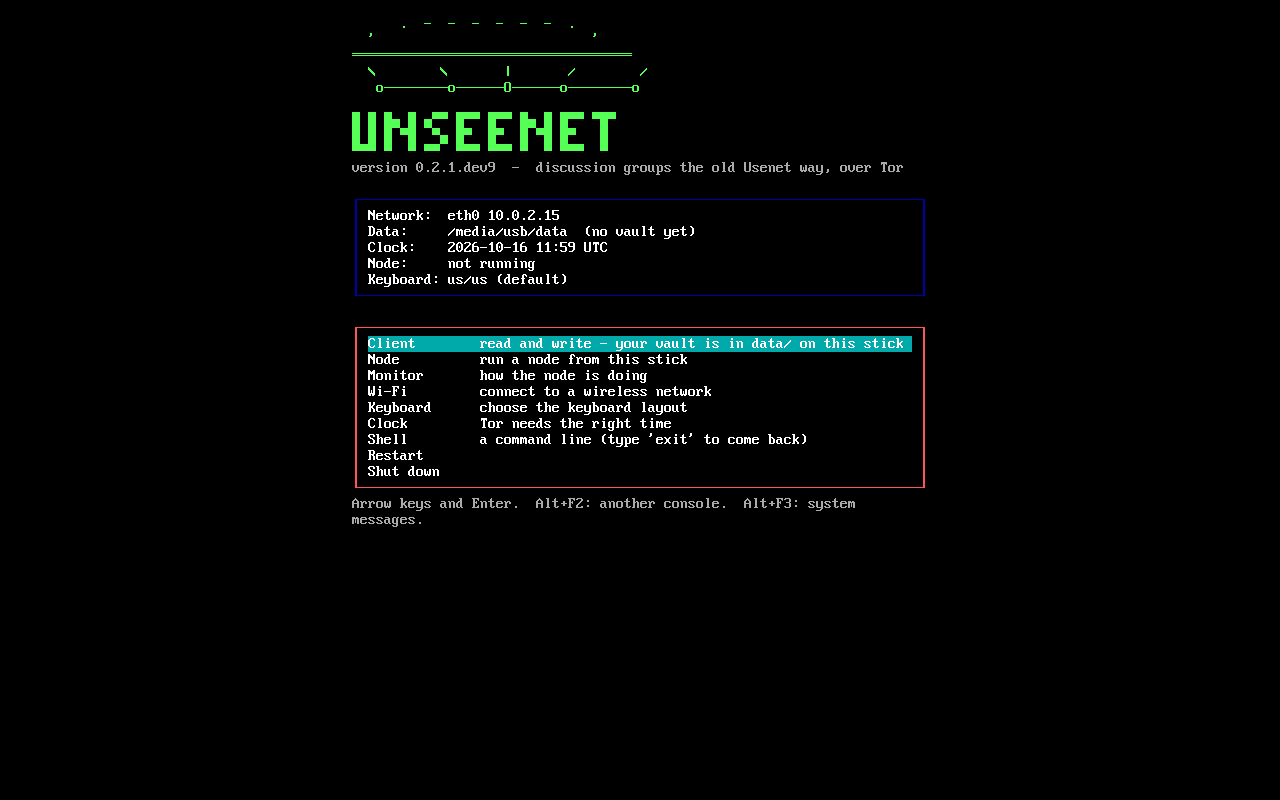
After half a minute the Unseenet menu comes up:
| Client | The terminal client, with the vault in data/ on the stick |
| Node | Run a node from the stick; its data is in data/node/, its settings in data/node/node.toml |
| Monitor | How the node is doing |
| Wi-Fi | Pick a network and type its password. A network cable works by itself |
| Keyboard | The layout of your keyboard (remembered on the stick) |
| Clock | Tor needs the right time; many computers keep local time instead of UTC |
| Shell | A command line |
| Restart, Shut down |
If the screen stays black, choose safe graphics in the very first menu (the boot loader's). Alt+F2 gives another console, Alt+F3 shows the system's start-up messages.
Without booting
On a computer that is already running, open the stick and start
Start Unseenet.bat (Windows), Start Unseenet.command (macOS) or
sh start-linux.sh (Linux) - exactly as described for the
portable builds.
Updating
Choose Update in the menu: the stick fetches the newest release over
Tor, checks its signature, replaces the system files and restarts. data/
is kept. All about it, also without a network: Updating.
Your data
data/ on the stick holds your vault (keys, groups, contacts), the offline
cache and Tor's state. It is an ordinary folder on an ordinary FAT32
partition, so you can see it from any computer and copy it to another
stick or a portable installation to take your identity along.
The vault and the cache are encrypted with your passphrase; someone who finds the stick cannot read them - but can see that it is an Unseenet stick.
A node's articles (data/node/) are not encrypted on the stick: they are
what the node serves to anyone anyway. Closed groups and private messages are
end-to-end encrypted, so the node cannot read them either.
Coming
An encrypted partition on the same stick for everything, created on the first boot, and a guest mode that keeps nothing; and an image for the Raspberry Pi (#97).
What is on it
Alpine Linux, running from memory: the Linux kernel with drivers and the
firmware for common Wi-Fi chips (Intel, Realtek, Atheros/Qualcomm,
MediaTek, Broadcom), Python, Tor, iwd for Wi-Fi, and Unseenet. No desktop,
no browser, no network service listening. About 1 GB, most of it the portable
builds for Windows, macOS and Linux.
It is built with one script, tools/image/build.sh, in an Alpine container,
and booted in QEMU by GitHub Actions for every change (BIOS and UEFI), where
its self-test must pass with Tor connecting. Everything is in
tools/image/ -
small and plain on purpose, so you can build a nicer one on top.
tools/image/build.sh unseenet-0.3.0-usb.zip       # dist/image/unseenet-*.img(.xz)
tools/image/boot-test.sh dist/image/unseenet-*.img uefi